C# DESKTOP APPLICATION · SAP WORKFLOW AUTOMATION
01Maintenance Planner
A planning application that converts exported SAP work into balanced, technician-ready schedules and reusable reporting output.
Business Problem
Weekly maintenance planning required the same manual sequence over and over: export work from SAP, interpret priorities, compare technician trades and shifts, account for production and investment blocks, balance available hours, and rebuild a plan that other teams could see. SAP remained the system of record, but it did not provide the exact planning view needed for this local workflow. The repeated administrative work consumed time that was better spent resolving exceptions, coordinating access, and improving job readiness.
Why I Built It
I built the planner because I was experiencing the problem firsthand. The goal was to preserve planner judgment while moving predictable checks and transformations into software. A useful solution needed to respect how maintenance actually operates—not just arrange rows in a spreadsheet. It had to understand trades, rotating teams, weekly capacity, production constraints, locked assignments, and the reporting format used by the business.
Solution
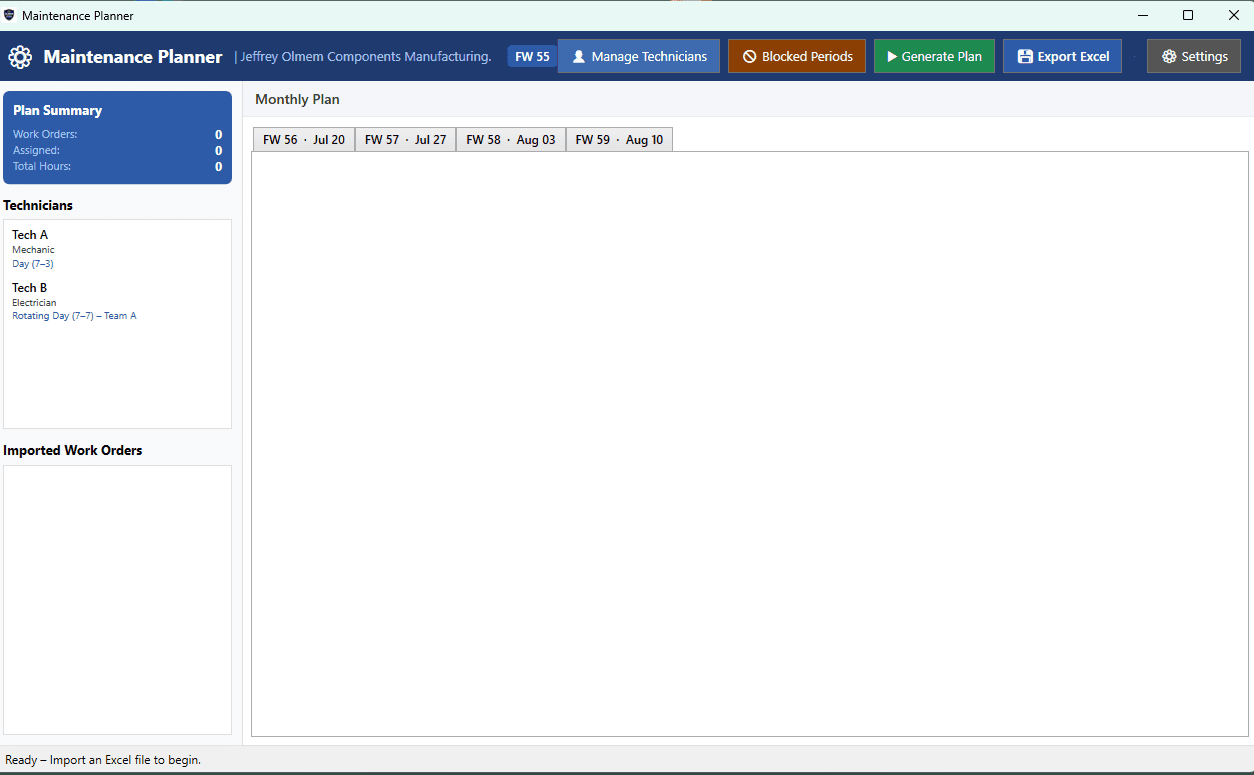
The desktop application ingests SAP-style Excel exports, normalizes work-order fields, stores planner and technician settings, applies scheduling rules, and presents an editable monthly plan. It then generates formatted CSV/Excel output that can be shared through SharePoint for broader operational visibility. The architecture keeps SAP as the source of truth while creating a purpose-built planning layer around the work planners must perform.
Architecture
A simplified view of how information moves through the solution.
Why These Technologies?
Technology choices were made around operating constraints, maintainability, integration boundaries, and the people using the system.
C#
Strong typing, mature business tooling, and direct alignment with Windows-based enterprise environments made it a practical choice for a durable internal application.
.NET / WPF
WPF supports data-heavy desktop interfaces, editable grids, dialogs, and local deployment without requiring an internal web-hosting dependency.
ClosedXML
It provides readable C# APIs for importing and producing Excel-compatible files while avoiding fragile cell-by-cell COM automation.
MVVM-style separation
Separating planning logic from the interface makes scheduling rules easier to test, revise, and eventually connect to SAP through a formal connector.
CSV / Excel
These formats fit the business's existing SAP export and SharePoint visibility workflow, reducing adoption friction.
Technical Highlights
Languages
C#
Frameworks
.NET · WPF
Databases
Local configuration
Cloud
SharePoint
Machine Learning
Rule-based optimization
AI
Future-ready
APIs
SAP integration path
Deployment
Windows desktop
Challenges Solved
The hardest problem was not reading an Excel file. It was translating human planning judgment into rules without making the system too rigid. Rotating shifts, technician trades, production blocks, regulatory priorities, capacity, and locked work all interact.
I separated normalization, scheduling constraints, editable assignments, and export logic. The application proposes a consistent plan but keeps the planner in control of exceptions and final decisions.
Operational software succeeds when it automates repetition while preserving expert judgment. Designing around exceptions is just as important as designing the normal path.
Engineering Spotlight
Concise implementation patterns that show the engineering beneath the interface.
csharpCapacity-aware assignment pattern+
Representative implementation pattern · private source protected
This representative pattern shows the central engineering idea: reject work that violates calendar, trade, or weekly-capacity constraints before assigning it to a technician.
public bool CanAssign(
    WorkOrder order,
    Technician technician,
    FiscalWeek week)
{
    if (calendar.IsBlocked(week, order.WorkCenter))
        return false;

    if (!technician.Trades.Contains(order.RequiredTrade))
        return false;

    var assignedHours = plan
        .For(technician, week)
        .Sum(item => item.EstimatedHours);

    return assignedHours + order.EstimatedHours
        <= technician.MaxHoursFor(week);
}csharpSafe export boundary+
Representative implementation pattern · private source protected
Export is treated as a separate boundary so planning data can be validated and transformed into the exact columns needed for downstream SharePoint reporting.
var exportRows = plan.Items
    .OrderBy(item => item.FiscalWeek)
    .ThenBy(item => item.TechnicianName)
    .Select(item => new PlanExportRow
    {
        WorkOrder = item.WorkOrderNumber,
        Technician = item.TechnicianName,
        FiscalWeek = item.FiscalWeek.Label,
        PlannedHours = item.EstimatedHours,
        WorkCenter = item.WorkCenter
    });

exportService.WriteCsv(exportRows, destinationPath);Business Impact
- Reduces repeated manual work involved in rebuilding weekly planning views.
- Applies scheduling and workload rules more consistently across planning cycles.
- Centralizes technician, calendar, and blocked-period information in one workflow.
- Produces reusable CSV/Excel output for SharePoint visibility across the business.
- Returns planner time to coordination, exceptions, readiness, and reliability work.
Source remains private to protect business logic, credentials, customer information, and proprietary workflows.